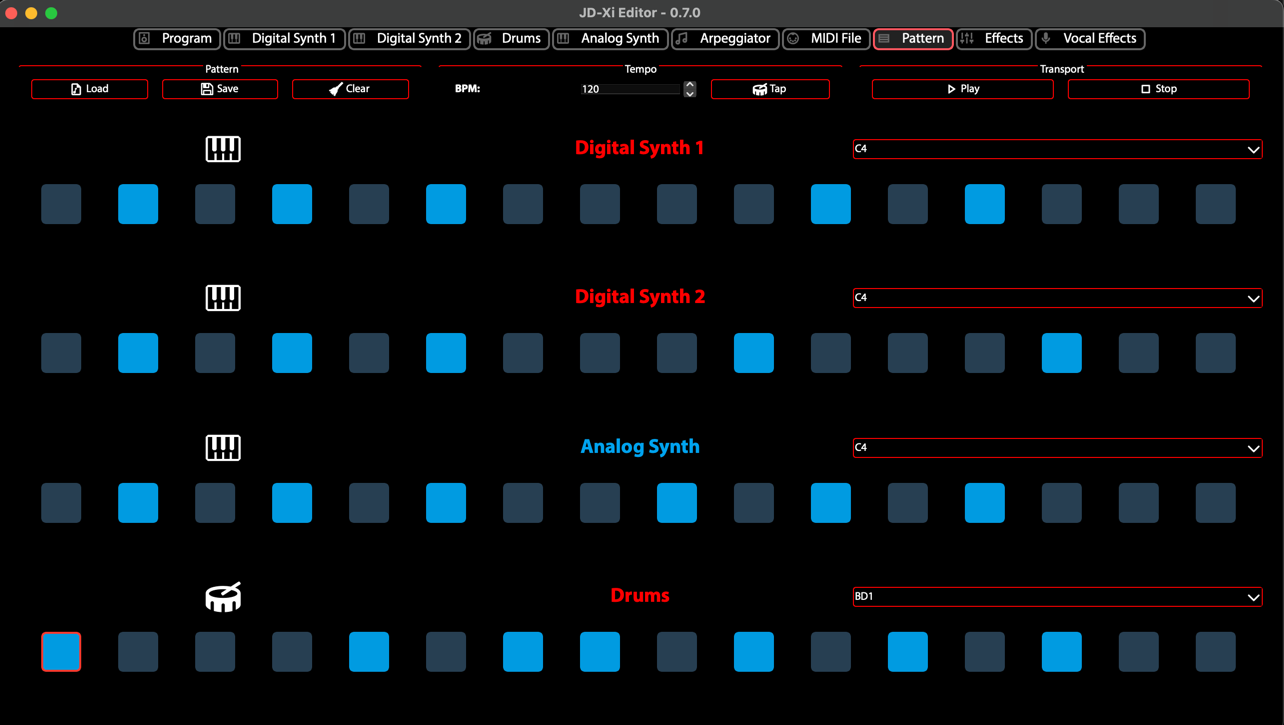
Pattern Sequencer
The Pattern Sequencer provides comprehensive control over the JD-Xi’s pattern creation and sequencing capabilities, offering advanced pattern creation and multi-part sequencing. This powerful editor transforms your JD-Xi’s pattern sequencer into a professional-grade sequencing workstation.
Built with advanced Qt6 technology and featuring real-time parameter control, the Pattern Sequencer serves as your primary workspace for creating, editing, and managing complex patterns and sequences with the precision and control of modern software synthesizers.
What is the Pattern Sequencer?
The Pattern Sequencer is a specialized interface that provides deep, granular control over the JD-Xi’s pattern creation and sequencing capabilities. Unlike the limited hardware interface, this editor offers expansive, visual control over every parameter with real-time feedback, advanced organization tools, and professional-grade editing capabilities.
The editor represents a dedicated workspace optimized for pattern creation and sequencing, from basic step sequences to complex multi-part patterns. The editor automatically synchronizes with your JD-Xi hardware, ensuring that every change is instantly reflected in your synthesizer’s sound.
Core Architecture & Design
- ** Multi-Part Sequencing**
The Pattern Sequencer features a sophisticated multi-part sequencing system: - 4-Part Control: Independent pattern creation for each synthesizer part - Step-by-Step Editing: Precise control over timing, velocity, and note placement - Real-time Recording: Live pattern creation and editing - Pattern Management: Organization, storage, and recall of your sequences
- ** Advanced Parameter Management**
Comprehensive Parameter Mapping: Every sequencer parameter is accessible through intuitive controls
Real-time Updates: Instant parameter changes with immediate hardware response
Visual Feedback: Live parameter displays, value indicators, and status monitoring
Preset Integration: Seamless loading, saving, and management of your custom patterns
- ** Professional Workflow Tools**
Multi-Pattern Support: Work with multiple patterns simultaneously
Advanced Organization: Categorize, search, and manage your pattern library
Project Integration: Export and import patterns for use in your DAW
Performance Optimization: Low-latency response for live performance and recording
Pattern Sequencer Features
- Multi-Part Sequencing
Independent pattern creation for each synthesizer part:
- Part Management
Part Selection: Choose which part to sequence
Part Patterns: Individual patterns per part
Part Synchronization: Synchronize patterns between parts
Part Mixing: Mix patterns from different parts
- Part Control
Part Mute/Solo: Mute or solo individual parts
Part Volume: Control volume per part
Part Pan: Control panning per part
Part Effects: Apply effects per part
- Step-by-Step Editing
Precise control over timing, velocity, and note placement:
- Step Grid
Grid Display: Visual representation of step grid
Grid Resolution: Adjustable grid resolution
Grid Snap: Snap to grid for precise timing
Grid Zoom: Zoom in/out for detailed editing
- Step Editing Tools
Step Selection: Select individual or multiple steps
Step Copy/Paste: Copy and paste step data
Step Clear: Clear step data
Step Fill: Fill steps with patterns
- Real-time Recording
Live pattern creation and editing:
- Recording Modes
Real-time Recording: Record patterns in real-time
Step Recording: Record patterns step by step
Overdub Recording: Add to existing patterns
Replace Recording: Replace existing patterns
- Recording Control
Record Start/Stop: Control recording start and stop
Record Quantization: Quantize recorded notes
Record Velocity: Record velocity information
Record Timing: Record timing information
Advanced Pattern Features
- Pattern Variation
Advanced pattern variation and development tools:
- Variation Types
Rhythmic Variations: Vary rhythm and timing
Melodic Variations: Vary note order and selection
Harmonic Variations: Vary chord and harmony
Dynamic Variations: Vary velocity and expression
- Variation Control
Variation Amount: Control amount of variation
Variation Types: Choose types of variation
Variation Timing: Control when variations occur
Variation Learning: Learn from user preferences
- Pattern Morphing
Morph between different patterns:
- Morphing Types
Linear Morphing: Linear interpolation between patterns
Non-linear Morphing: Non-linear interpolation
Selective Morphing: Morph specific parameters
Custom Morphing: User-defined morphing
- Morphing Control
Morph Amount: Control amount of morphing
Morph Speed: Control speed of morphing
Morph Direction: Control direction of morphing
Morph Automation: Automate morphing parameters
- Pattern Blending
Blend multiple patterns together:
- Blending Types
Additive Blending: Add patterns together
Multiplicative Blending: Multiply patterns
Selective Blending: Blend specific parameters
Custom Blending: User-defined blending
- Blending Control
Blend Amount: Control amount of blending
Blend Balance: Control balance between patterns
Blend Automation: Automate blending parameters
Blend Presets: Save and recall blending settings
Performance Features
- Live Performance
Real-time pattern switching and manipulation:
- Performance Controls
Pattern Switching: Switch between patterns in real-time
Pattern Mixing: Mix multiple patterns simultaneously
Pattern Automation: Automate pattern changes
Pattern Synchronization: Synchronize patterns with external clock
- Performance Modes
Live Mode: Optimized for real-time performance
Edit Mode: Detailed parameter editing
Preset Mode: Quick preset switching
Learn Mode: MIDI controller learning
- Pattern Automation
Advanced pattern automation capabilities:
- Automation Types
Pattern Automation: Automate pattern changes
Parameter Automation: Automate pattern parameters
Timing Automation: Automate timing changes
Velocity Automation: Automate velocity changes
- Automation Control
Automation Recording: Record automation data
Automation Playback: Play back recorded automation
Automation Editing: Edit recorded automation
Automation Management: Organize and manage automation
- Musical Integration
Seamless integration with your musical compositions:
- DAW Integration
MIDI Export: Export patterns as MIDI files
Audio Export: Export patterns as audio files
Project Integration: Integrate with DAW projects
Synchronization: Sync with DAW tempo and timing
- Live Performance
Live Switching: Switch patterns during performance
Live Editing: Edit patterns during performance
Live Recording: Record new patterns during performance
Live Synchronization: Sync with external clock
Creative Tools
- Advanced Tools
Advanced tools for musical expression and creativity:
- Expression Control
Velocity Curves: Custom velocity response
Timing Curves: Custom timing response
Expression Mapping: Map expression to parameters
Expression Automation: Automate expression parameters
- Creative Features
Pattern Randomization: Randomize pattern elements
Pattern Learning: Learn from user input
Pattern Evolution: Evolve patterns over time
Pattern Templates: Use pattern templates
- Pattern Templates
Pre-built pattern templates for quick start:
- Template Types
Drum Patterns: Pre-built drum patterns
Bass Patterns: Pre-built bass patterns
Melodic Patterns: Pre-built melodic patterns
Harmonic Patterns: Pre-built harmonic patterns
- Template Control
Template Selection: Choose from available templates
Template Customization: Customize template parameters
Template Saving: Save custom templates
Template Sharing: Share templates with others
Visual Feedback & Monitoring
- Real-time Visualization
Live display of patterns and parameter relationships:
- Pattern Display
Step Grid: Visual representation of step grid
Note Display: Visual representation of notes
Velocity Display: Visual representation of velocity
Timing Display: Visual representation of timing
- Parameter Display
Parameter Meters: Real-time parameter level display
Parameter Graphs: Visual representation of parameters
Parameter Comparison: Compare different parameter settings
Parameter Automation: Visual automation display
- Parameter Monitoring
Comprehensive display of current settings and parameter relationships:
- Value Displays
Numerical Values: Precise parameter values
Bar Graphs: Visual parameter levels
Meters: Real-time level monitoring
Status Indicators: Parameter state indicators
- Relationship Display
Pattern Chain: Visual pattern routing
Parameter Dependencies: Show parameter relationships
Modulation Matrix: Visual modulation routing
Signal Flow: Audio signal path display
Getting Started with Pattern Sequencer
- Initial Setup
Launch Pattern Sequencer: Open the Pattern Sequencer from the main interface
Load a Pattern: Start with a factory pattern to understand the interface
Explore Controls: Familiarize yourself with the available parameters and controls
Test Your Changes: Play patterns using the virtual keyboard or MIDI controller
- Basic Workflow
Choose a Part: Select which synthesizer part to sequence
Create a Pattern: Use step editing or real-time recording
Edit Steps: Modify individual steps in the pattern
Save Your Work: Use the pattern management system to save your creations
- Advanced Techniques
Multi-Part Sequencing: Create patterns for multiple synthesizer parts
Pattern Variation: Create variations of existing patterns
Pattern Morphing: Morph between different patterns
Performance Integration: Optimize the interface for live performance
- Tips for Effective Pattern Creation
Start Simple: Begin with basic patterns and simple parameters
Use Templates: Use pattern templates for quick start
Experiment with Variation: Create variations of existing patterns
Save Frequently: Save your work regularly to avoid losing changes
The Pattern Sequencer transforms your Roland JD-Xi’s sequencing capabilities into a professional-grade sequencing workstation, providing the tools and interface you need to create, edit, and manage sophisticated patterns and sequences with the precision and control of modern software synthesizers.
Pattern Sequencer - Multi-Part Sequencing