MIDI File Player
The MIDI File Player provides playback of MIDI files through the Roland JD-Xi or through FluidSynth (SoundFont) when no hardware is connected. It includes track classification, channel assignment, and integration with the Pattern Editor.
What is the MIDI File Player?
The MIDI File Player loads standard MIDI files (.mid, .midi) and routes tracks to the JD-Xi’s four parts: Digital 1 (Ch 1), Digital 2 (Ch 2), Analog (Ch 3), and Drums (Ch 10). You can classify tracks automatically, assign channels, and load the current file into the Pattern Editor for step editing.
Core Features
- MIDI Playback
Load files: Open .mid or .midi files via File menu or drag-and-drop
Playback control: Play, pause, stop, and seek
JD-Xi playback: Routes MIDI to the connected synthesizer
FluidSynth playback: When no JD-Xi is connected, uses FluidSynth with a SoundFont (.sf2/.sf3) for software playback
- Track Classification
Detect Drums: Identifies drum tracks and assigns them to MIDI Channel 10
Classify Tracks: Classifies non-drum tracks into Bass (Ch 1), Keys/Guitars (Ch 2), and Strings (Ch 3)
Apply Presets: Applies channel presets for JD-Xi part routing
Apply All Track Changes: Applies all track changes (channel assignments, etc.) to the loaded file
- Channel Assignment
Channels 1, 2, 3 map to Digital 1, Digital 2, Analog
Channel 10 maps to Drums
Drag-and-drop track reordering and channel assignment in the track list
- Pattern Editor Integration
Load into Pattern Editor: Loads the current MIDI file into the Pattern Sequencer for step editing
- Format Support
Standard MIDI Files: .mid, .midi
MIDI Type 0 and Type 1
SoundFont Playback
When Enable FluidSynth for local playback is enabled in MIDI Configuration (and no JD-Xi is connected), the MIDI File Player uses FluidSynth with a configured SoundFont for playback. This allows you to play MIDI files without hardware.
See features-and-usage for SoundFont configuration (path, preset list, etc.).
Workflow
Load a MIDI file: File → Open… or drag-and-drop
Classify tracks (optional): Use Detect Drums and Classify Tracks to auto-assign channels
Apply changes: Use Apply All Track Changes or Apply Presets to apply channel assignments
Play: Start playback; audio goes to JD-Xi or FluidSynth
Edit in Pattern Editor (optional): Use Load into Pattern Editor to edit the file in the Pattern Sequencer
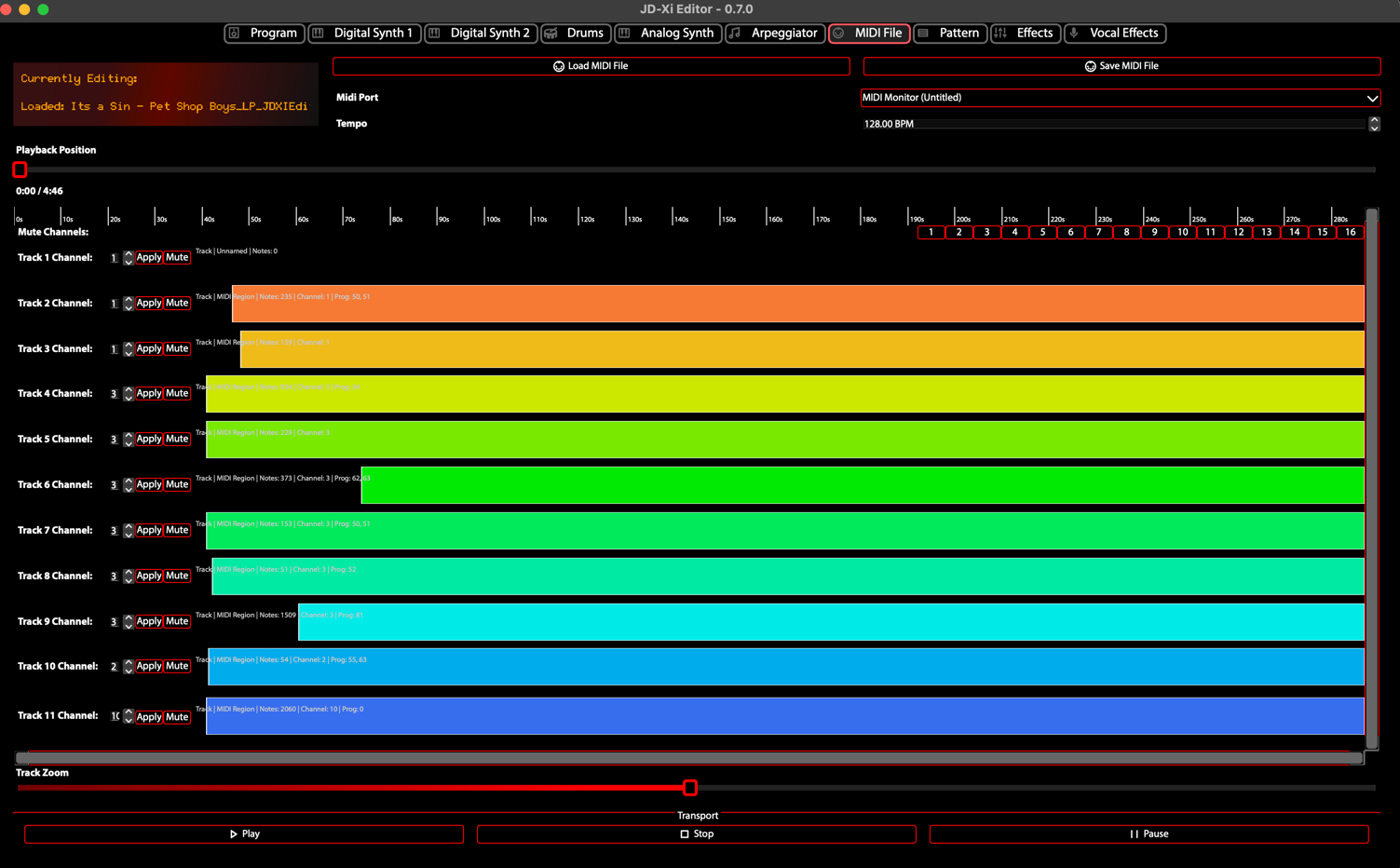
MIDI File Player - Track Classification and Playback