Effects Editor
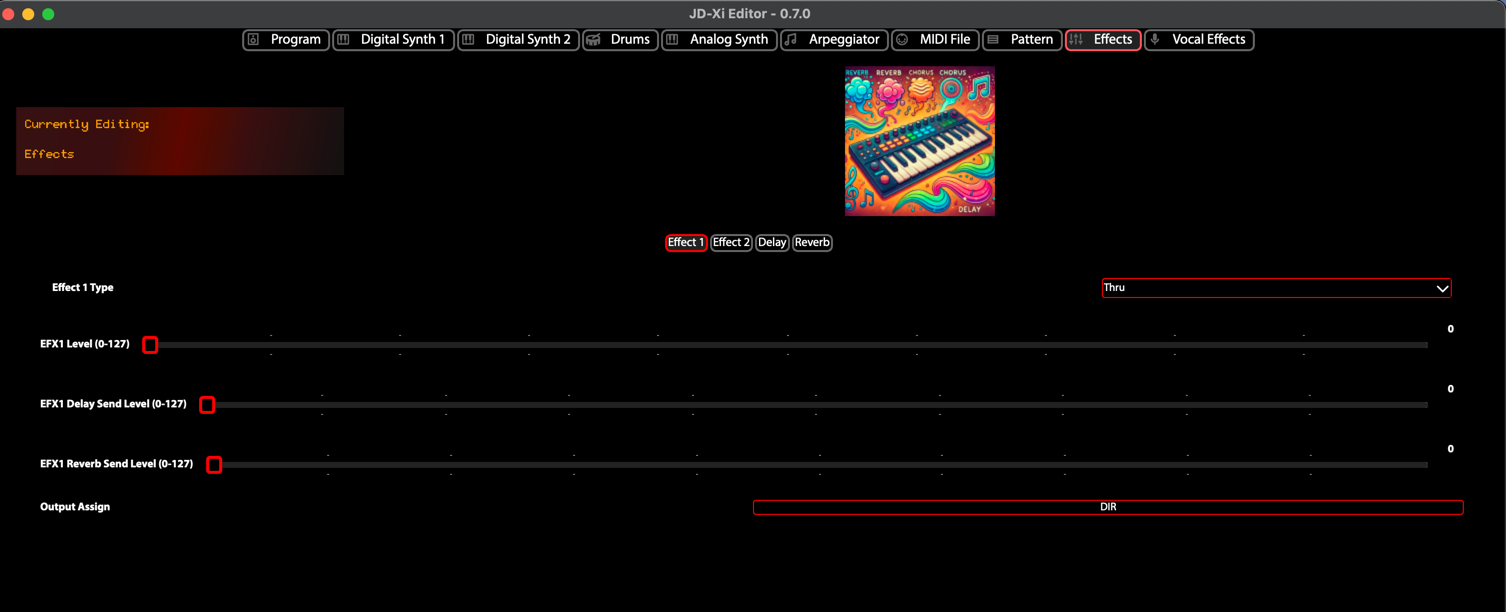
The Effects Editor provides comprehensive control over the JD-Xi’s master effects processing, offering professional-grade effects processing and sound manipulation capabilities. This powerful editor transforms your JD-Xi’s effects into a professional-grade audio processing workstation.
Built with advanced Qt6 technology and featuring real-time parameter control, the Effects Editor serves as your primary workspace for creating, editing, and managing sophisticated effects chains with the precision and control of modern software synthesizers.
What is the Effects Editor?
The Effects Editor is a specialized interface that provides deep, granular control over the JD-Xi’s master effects processing. Unlike the limited hardware interface, this editor offers expansive, visual control over every parameter with real-time feedback, advanced organization tools, and professional-grade editing capabilities.
The editor represents a dedicated workspace optimized for effects processing, from basic time-based effects to complex multi-effects chains. The editor automatically synchronizes with your JD-Xi hardware, ensuring that every change is instantly reflected in your synthesizer’s sound.
JD-Xi Implementation
The Effects Editor uses two tabs with 2-column grids:
Effects 1 & 2: Effect 1 and Effect 2 side by side
Delay & Reverb: Delay and Reverb side by side
Each section is displayed in a labeled group box. This keeps Delay and Reverb visible without scrolling past the effect sections.
- Polymorphic Effect Sections
Effect 1 and Effect 2 use polymorphic UI: when you change the effect type, the controls below update to show only the parameters relevant to that type. No more show/hide of unrelated controls.
- Effect 1 (Thru, Distortion, Fuzz, Compressor, Bit Crusher):
Thru: Bypass; no additional parameters
Distortion / Fuzz: Type (0–5), Level, Drive, Presence
Compressor: Threshold, Ratio, Attack, Release, Level, Side Chain (On/Off, Side Level, Side Note, Side Time, Side Release, Side Sync)
Bit Crusher: Level, Sample Rate, Bit Depth, Filter
- Effect 2 (Off, Flanger, Phaser, Ring Mod, Slicer):
Off: Bypass; no additional parameters
Flanger: Rate/Note switch, Rate, Note, Depth, Feedback, Manual, Balance [dry->wet], Level
Phaser: Rate/Note switch, Rate, Note, Depth, Resonance, Effect Level
Ring Mod: Frequency, Sensitivity, Balance [dry->wet], Level
Slicer: Timing pattern, Rate [Note], Attack Time, Trigger Level, Level
- Delay
On/Off, Type (SINGLE/PAN), Time/Note mode, Note dropdown (when in Note mode), HF Damp, Level, Reverb send, Time [ms], Tap Time [%], Feedback [%].
- Reverb
On/Off, Type (Room 1/2, Stage 1/2, Hall 1/2), HF Damp, Time, Level.
Core Architecture & Design
- ** Professional Effects Processing**
The Effects Editor features a sophisticated effects processing system: - High-Quality Algorithms: Professional-grade effect processing with minimal latency - Real-time Parameter Control: Live manipulation of all effect parameters - Effect Chaining: Complex multi-effects routing and processing - Preset Management: Save and recall your favorite effect combinations
- ** Advanced Parameter Management**
Comprehensive Parameter Mapping: Every effects parameter is accessible through intuitive controls
Real-time Updates: Instant parameter changes with immediate hardware response
Visual Feedback: Live parameter displays, value indicators, and status monitoring
Preset Integration: Seamless loading, saving, and management of your custom effects
- ** Professional Workflow Tools**
Multi-Effects Support: Work with multiple effects simultaneously
Advanced Organization: Categorize, search, and manage your effects library
Project Integration: Export and import effects for use in your DAW
Performance Optimization: Low-latency response for live performance and recording
Effects Editor Features
- Time-Based Effects
Professional-quality time-based effects with real-time parameter control:
- Reverb Effects
Reverb Types: Hall, room, plate, and spring reverb
Reverb Parameters: Size, decay, damping, and diffusion
Reverb Modulation: LFO and envelope modulation of reverb
Reverb EQ: Frequency shaping within reverb
- Delay Effects
Delay Types: Digital, analog, and tape delay
Delay Parameters: Time, feedback, and mix
Delay Modulation: LFO and envelope modulation of delay
Delay Filtering: Frequency filtering within delay
- Dynamic Processing
Dynamic processing and harmonic enhancement:
- Compression
Compressor Types: VCA, optical, and FET compression
Compressor Parameters: Threshold, ratio, attack, and release
Compressor Sidechain: External sidechain control
Compressor EQ: Frequency-dependent compression
- Distortion
Distortion Types: Tube, transistor, and digital distortion
Distortion Parameters: Drive, tone, and mix
Distortion Modeling: Accurate modeling of classic distortion
Distortion EQ: Frequency shaping within distortion
- Modulation Effects
Stereo width and movement effects:
- Chorus Effects
Chorus Types: Classic, modern, and stereo chorus
Chorus Parameters: Rate, depth, and mix
Chorus Modulation: LFO and envelope modulation
Chorus Stereo: Stereo width and positioning
- Flanger Effects
Flanger Types: Classic, modern, and stereo flanger
Flanger Parameters: Rate, depth, feedback, and mix
Flanger Modulation: LFO and envelope modulation
Flanger Stereo: Stereo width and positioning
- Multi-Effects Chain
Layer multiple effects for complex sound design:
- Effect Routing
Serial Routing: Effects in series
Parallel Routing: Effects in parallel
Mixed Routing: Combination of serial and parallel
Custom Routing: User-defined routing
- Effect Mixing
Effect Balance: Balance between effects
Effect Crossfading: Smooth transitions between effects
Effect Mute/Solo: Mute or solo individual effects
Effect Bypass: Bypass individual effects
Advanced Processing
- Effect Routing
Sophisticated routing options for complex effect chains:
- Routing Types
Serial Routing: Effects processed in sequence
Parallel Routing: Effects processed simultaneously
Mixed Routing: Combination of serial and parallel
Custom Routing: User-defined routing configurations
- Routing Control
Routing Matrix: Visual representation of routing
Routing Automation: Automate routing changes
Routing Presets: Save and recall routing configurations
Routing Templates: Use routing templates
- Parameter Automation
Real-time control of all effect parameters:
- Automation Types
LFO Automation: Low-frequency oscillator automation
Envelope Automation: Envelope follower automation
External Automation: MIDI controller automation
Internal Automation: Self-automation capabilities
- Automation Control
Automation Recording: Record parameter changes
Automation Playback: Play back recorded automation
Automation Editing: Edit recorded automation
Automation Management: Organize and manage automation
- Preset Management
Save and recall your favorite effect combinations:
- Preset Organization
Preset Categories: Organize presets by type or style
Preset Tags: Add custom tags for easy searching
Preset Favorites: Mark frequently used presets
Preset Recent: Quick access to recently used presets
- Preset Operations
Save Preset: Save current effect configuration
Load Preset: Load existing effect presets
Copy Preset: Duplicate existing presets
Delete Preset: Remove unwanted presets
Performance Integration
- Live Performance Mode
Optimized interface for real-time performance:
- Performance Controls
Large Controls: Easy-to-use controls for live performance
Visual Feedback: Clear indication of current settings
Quick Access: Fast access to frequently used parameters
Preset Switching: Quick preset changes during performance
- Real-time Updates
Instant Response: Immediate parameter changes
Smooth Transitions: Gradual parameter changes
MIDI Control: External controller integration
Automation: Parameter automation support
- MIDI Integration
Full support for external MIDI controllers and keyboards:
- Controller Support
MIDI Learn: Assign any parameter to any controller
Controller Mapping: Save and recall controller mappings
Multiple Controllers: Support for multiple MIDI controllers
Controller Profiles: Different profiles for different setups
- Keyboard Integration
Note Input: Play notes using MIDI keyboard
Velocity Sensitivity: Respond to playing dynamics
Aftertouch: Support for pressure sensitivity
Pitch Bend: Pitch bend wheel support
Visual Feedback & Monitoring
- Real-time Visualization
Live display of effect parameters and audio levels:
- Effect Display
Parameter Meters: Real-time parameter level display
Effect Graphs: Visual representation of effect parameters
Effect Comparison: Compare different effect settings
Effect Automation: Visual automation display
- Audio Monitoring
Level Meters: Real-time audio level monitoring
Spectrum Analysis: Frequency domain display
Waveform Display: Real-time waveform visualization
Phase Display: Stereo phase relationship display
- Parameter Monitoring
Comprehensive display of current settings and parameter relationships:
- Value Displays
Numerical Values: Precise parameter values
Bar Graphs: Visual parameter levels
Meters: Real-time level monitoring
Status Indicators: Parameter state indicators
- Relationship Display
Effect Chain: Visual effects routing
Parameter Dependencies: Show parameter relationships
Modulation Matrix: Visual modulation routing
Signal Flow: Audio signal path display
Getting Started with Effects Editor
- Initial Setup
Launch Effects Editor: Open the Effects Editor from the main interface
Load a Preset: Start with a factory effect preset to understand the interface
Explore Controls: Familiarize yourself with the available parameters and controls
Test Your Changes: Play notes using the virtual keyboard or MIDI controller
- Basic Workflow
Choose an Effect: Select the type of effect you want to use
Adjust Parameters: Use sliders, knobs, and controls to modify settings
Test Your Changes: Play notes to hear the effect
Save Your Work: Use the preset management system to save your creations
- Advanced Techniques
Effect Chaining: Chain multiple effects for complex processing
Parameter Automation: Automate effect parameters for movement
Effect Layering: Layer multiple effects for rich, complex sounds
Performance Integration: Optimize the interface for live performance
- Tips for Effective Effects Processing
Start Simple: Begin with basic effects and simple parameters
Use Modulation: Experiment with LFO and envelope modulation
Layer Effects: Combine multiple effects for complex processing
Save Frequently: Save your work regularly to avoid losing changes
The Effects Editor transforms your Roland JD-Xi’s effects processing capabilities into a professional-grade audio processing workstation, providing the tools and interface you need to create, edit, and manage sophisticated effects chains with the precision and control of modern software synthesizers.
Master Effects Editor - Professional Processing