Drum Kit Editor
The Drum Kit Editor provides comprehensive control over the JD-Xi’s drum synthesis engine, offering professional drum sound design and kit management capabilities. This powerful editor transforms your JD-Xi’s drum synthesis into a professional-grade percussion workstation.
Built with advanced Qt6 technology and featuring real-time parameter control, the Drum Kit Editor serves as your primary workspace for creating, editing, and managing sophisticated drum sounds with the precision and control of modern software synthesizers.
What is the Drum Kit Editor?
The Drum Kit Editor is a specialized interface that provides deep, granular control over the JD-Xi’s drum synthesis engine. Unlike the limited hardware interface, this editor offers expansive, visual control over every parameter with real-time feedback, advanced organization tools, and professional-grade editing capabilities.
The editor represents a dedicated workspace optimized for drum sound design, from basic voice control to complex kit management. The editor automatically synchronizes with your JD-Xi hardware, ensuring that every change is instantly reflected in your synthesizer’s sound.
Core Architecture & Design
- 🥁 36 Individual Drum Voices
The Drum Kit Editor features a comprehensive voice management system: - Complete Voice Control: Individual control over each of the 36 drum sounds - Advanced Voice Shaping: Pitch, filter, envelope, and effects per voice - Kit Organization: Custom drum kit creation and management - Performance Features: Real-time voice switching and parameter control
- ** Advanced Parameter Management**
Comprehensive Parameter Mapping: Every drum voice parameter is accessible through intuitive controls
Real-time Updates: Instant parameter changes with immediate hardware response
Visual Feedback: Live parameter displays, value indicators, and status monitoring
Preset Integration: Seamless loading, saving, and management of your custom drum kits
- ** Professional Workflow Tools**
Multi-Voice Support: Work with multiple drum voices simultaneously
Advanced Organization: Categorize, search, and manage your drum library
Project Integration: Export and import drum kits for use in your DAW
Performance Optimization: Low-latency response for live performance and recording
Drum Kit Editor Features
- Individual Voice Control
Complete control over each of the 36 drum voices:
- Voice Selection
Voice List: Complete list of all 36 drum voices
Voice Categories: Organized by drum type (kick, snare, hi-hat, etc.)
Voice Preview: Real-time preview of selected voices
Voice Management: Enable/disable individual voices
- Voice Parameters
Pitch Control: Precise pitch adjustment for each voice
Filter Control: Individual filter settings per voice
Envelope Control: ADSR settings for each voice
Effect Control: Individual effects per voice
- Sound Design Tools
Advanced tools for shaping drum sounds:
- Pitch Control
Pitch Adjustment: Fine and coarse pitch control
Pitch Modulation: LFO and envelope modulation of pitch
Pitch Envelope: Dedicated pitch envelope per voice
Pitch Scaling: Keyboard scaling for pitched drums
- Filter Processing
Filter Types: Low-pass, high-pass, and band-pass filters
Cutoff Control: Real-time filter cutoff adjustment
Resonance Control: Filter emphasis and character
Filter Modulation: LFO and envelope modulation of filter
- Envelope Shaping
ADSR Controls: Attack, decay, sustain, and release
Envelope Types: Different envelope shapes per voice
Envelope Modulation: Modulation of envelope parameters
Envelope Scaling: Time and level scaling
- Effects Processing
Individual effects processing per drum voice:
- Effect Types
Distortion: Harmonic enhancement and saturation
Compression: Dynamic control and punch
EQ: Frequency shaping and tone control
Reverb: Spatial effects and ambience
- Effect Parameters
Real-time Control: Live parameter manipulation
Effect Routing: Flexible effect chain routing
Preset Management: Save and recall effect settings
Performance Integration: Optimized for live performance
Kit Management System
- Kit Organization
Advanced organization and management of drum kits:
- Kit Structure
Kit Layout: Visual representation of drum kit layout
Voice Assignment: Assign voices to specific kit positions
Kit Naming: Custom names for drum kits
Kit Categories: Organize kits by style or genre
- Kit Operations
Save Kit: Save current kit configuration
Load Kit: Load existing drum kits
Copy Kit: Duplicate existing kits
Delete Kit: Remove unwanted kits
- Voice Management
Comprehensive control over individual drum voices:
- Voice Assignment
Kit Positions: Assign voices to specific kit positions
Voice Mapping: Custom voice-to-key mapping
Velocity Layers: Multiple velocity layers per voice
Voice Groups: Group related voices together
- Voice Editing
Individual Editing: Edit each voice independently
Bulk Editing: Edit multiple voices simultaneously
Voice Copying: Copy settings between voices
Voice Templates: Use voice templates for consistency
- Performance Features
Real-time voice switching and parameter control:
- Live Performance
Real-time Updates: Immediate parameter changes
Voice Switching: Quick voice changes during performance
Parameter Control: Live manipulation of voice parameters
Kit Switching: Quick kit changes during performance
- Performance Modes
Live Mode: Optimized for real-time performance
Edit Mode: Detailed parameter editing
Preset Mode: Quick preset switching
Learn Mode: MIDI controller learning
Advanced Sound Design
- Multi-Voice Layering
Sophisticated layering of multiple drum voices:
- Layer Management
Voice Layering: Layer multiple voices for complex sounds
Layer Mixing: Balance between layered voices
Layer Effects: Individual effects per layer
Layer Automation: Automate layer parameters
- Layer Control
Layer Selection: Choose which voices to layer
Layer Balance: Control the balance between layers
Layer Effects: Apply effects to individual layers
Layer Automation: Automate layer parameters
- Cross-Modulation
Advanced modulation between drum voices:
- Modulation Sources
LFO: Low-frequency oscillator modulation
Envelope: Envelope follower modulation
External: MIDI controller modulation
Internal: Voice-to-voice modulation
- Modulation Destinations
Pitch: Frequency modulation
Filter: Cutoff and resonance modulation
Amplitude: Volume modulation
Effects: Effect parameter modulation
- Creative Sound Design
Advanced tools for unique drum sounds:
- Sound Shaping
Waveform Editing: Custom waveform creation
Harmonic Control: Control harmonic content
Noise Generation: Add noise elements to sounds
Resonance Control: Control drum resonance
- Experimental Features
Granular Synthesis: Granular processing of drum sounds
Spectral Processing: Frequency domain manipulation
Time Stretching: Time-based manipulation
Pitch Shifting: Pitch-based manipulation
Visual Feedback & Monitoring
- Real-time Visualization
Live display of drum sounds and parameter relationships:
- Waveform Display
Live Waveforms: Real-time waveform visualization
Spectrum Analysis: Frequency domain display
Waveform Comparison: Compare different voices
Custom Waveforms: Display user-defined waveforms
- Envelope Visualization
ADSR Display: Visual representation of envelope stages
Envelope Editing: Graphical envelope editing
Envelope Comparison: Compare different envelopes
Envelope Automation: Visual automation display
- Parameter Monitoring
Comprehensive display of current settings and parameter relationships:
- Value Displays
Numerical Values: Precise parameter values
Bar Graphs: Visual parameter levels
Meters: Real-time level monitoring
Status Indicators: Parameter state indicators
- Relationship Display
Modulation Matrix: Visual modulation routing
Signal Flow: Audio signal path display
Parameter Dependencies: Show parameter relationships
Effect Chain: Visual effects routing
Getting Started with Drum Kit Editor
- Initial Setup
Launch Drum Kit Editor: Open the Drum Kit Editor from the main interface
Load a Kit: Start with a factory drum kit to understand the interface
Explore Voices: Familiarize yourself with the available drum voices
Test Your Changes: Play notes using the virtual keyboard or MIDI controller
- Basic Workflow
Choose a Voice: Select a drum voice to edit
Adjust Parameters: Use sliders, knobs, and controls to modify settings
Test Your Changes: Play the voice to hear your modifications
Save Your Work: Use the kit management system to save your creations
- Advanced Techniques
Voice Layering: Layer multiple voices for complex sounds
Cross-Modulation: Create modulation relationships between voices
Kit Organization: Organize your drum kits by style or genre
Performance Integration: Optimize the interface for live performance
- Tips for Effective Drum Sound Design
Start Simple: Begin with basic voices and simple parameters
Use Layering: Layer multiple voices for rich, complex sounds
Experiment with Modulation: Try different modulation sources and destinations
Save Frequently: Save your work regularly to avoid losing changes
The Drum Kit Editor transforms your Roland JD-Xi’s drum synthesis capabilities into a professional-grade percussion workstation, providing the tools and interface you need to create, edit, and manage sophisticated drum sounds with the precision and control of modern software synthesizers.
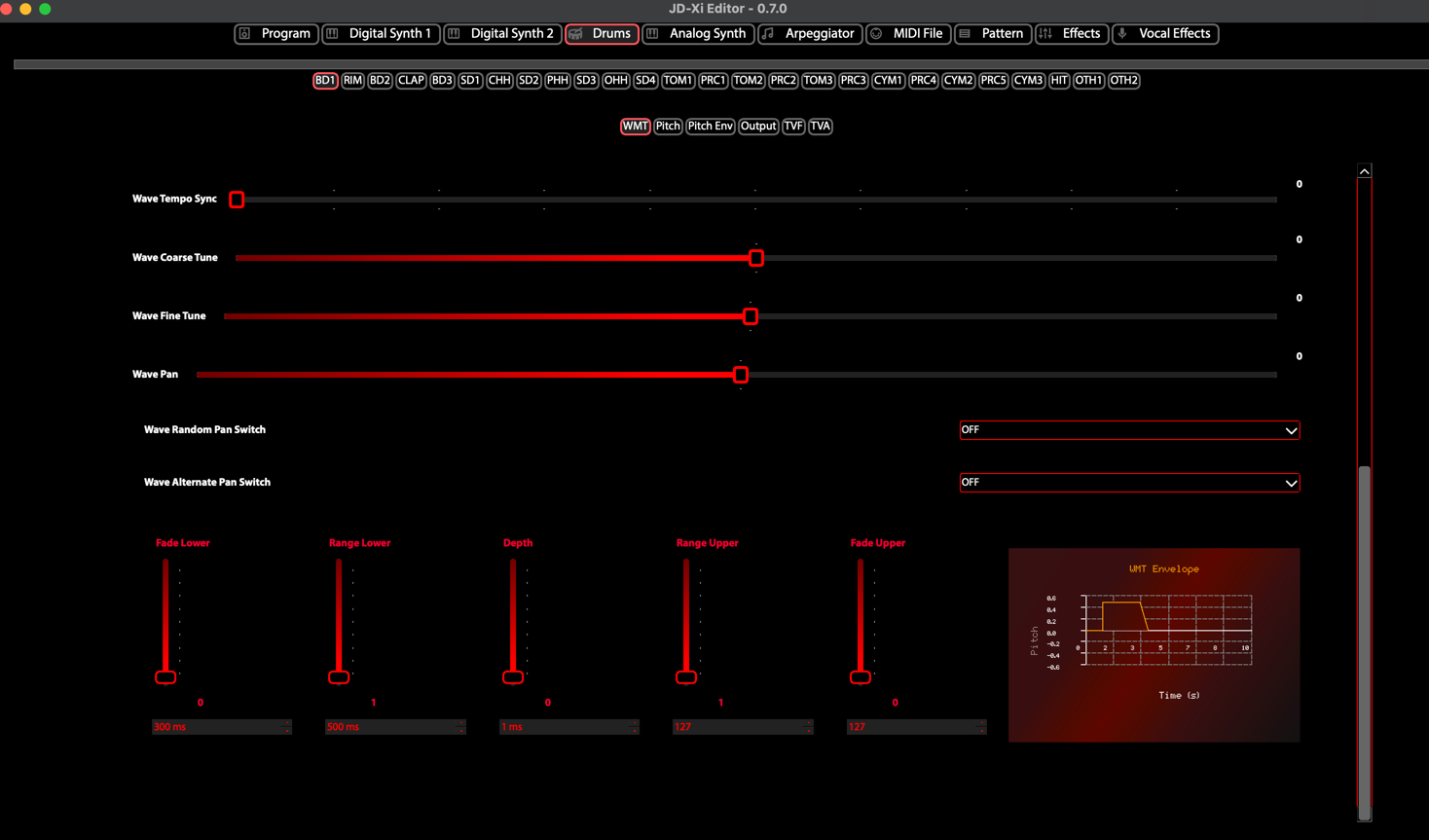
Drum Kit Editor - 36 Voice Control